


Shop more in Accessories
Explore similar accessories and discover more options in the same category.
Browse category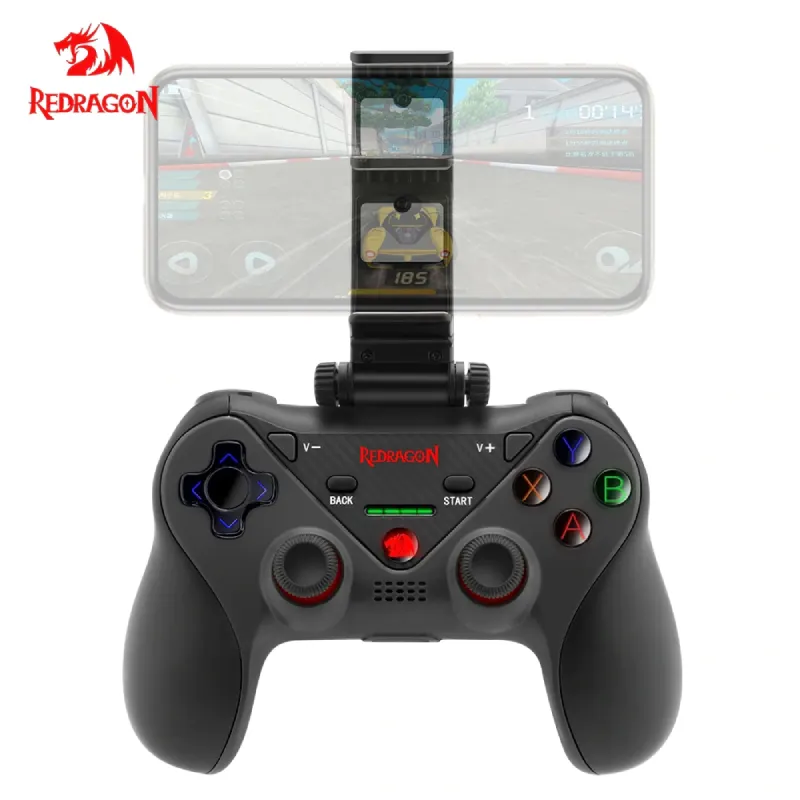
Currency: PKR
 We Deliver All Over Pakistan
We offer delivery services across Pakistan for your convenience. Here are the details of our shipping options:
 Leopards Courier
We also partner with Leopards Courier for deliveries throughout Pakistan. Here are the estimated delivery times for different scenarios:
Expedited delivery within 48 hours. Please note that the delivery times mentioned above are approximate and may vary depending on the location and other factors. We strive to ensure safe and secure shipping for all orders.
At WaddaGamer, we prioritize the safety and security of your packages to ensure a smooth delivery experience.
You can exchange any product purchased from WaddaGamer within 14 days of purchase under the following conditions:
To raise a dispute, please notify us within 3–4 days of delivery by contacting our support team via email at support@waddagamer.com or by calling 0300-0680143. Each dispute will be evaluated on a case-by-case basis, and we strive to find a fair resolution for both parties.
For damaged items, it is essential to provide an unboxing video as evidence. Please email the video to support@waddagamer.com within 14 days of purchase to initiate the replacement process.
Returns:
If a product received does not match the description on our website, you have 7 working days from the date of delivery to claim an exchange or cancel the order. To initiate a return, the product(s) must be undamaged, unopened, and returned with all packaging materials and documentation.
Refund Policy:
If an order is canceled for any reason, the refund will be processed within 3 to 4 days. In the event that you are not satisfied with your purchase or there are certain circumstances where a refund is applicable, WaddaGamer offers a refund policy. If the payment was made through a merchant, the refund will be processed through the same merchant channel.
Please note that if the payment was made via credit or debit card, any applicable refund may take 7 to 10 additional working days to reflect in your account, as per Pakistan's payment security standards.
To initiate a refund, please contact our support team at support@waddagamer.com or WhatsApp: 0300-0680143 within the specified time frame.
\nRedragon g812 ceres wireless gamepad joystick four in one function, Bluetooth android & IOS game controller support IOS and android work with PC X-input mode support PS4 multi stream on IOS.


Four in one function
lOS standard mode connection
No need Third-party gaming platform
Support more than 800 games that download from the App Store match lOS
standard protocol.
Support most of the standard Android games
Support Android game platforms, such as Octopus game; and Android HID mode
PS: The game controller should recognize automatically in Android HID mode and game platform mode
Support smartTV, smart set-top box
PS4 Multi-Stream( Support only iOS currently)
Download R-Play from App Store for iPhone, iPad, or iPod touch, follow the steps in App
A streaming function can make your Play Station4 stream to iPhone, iPad, or iPod touch,
you can play at any time and anywhere with the network.
PS: In order to experience the best streaming function, please connect your PS4 to your
home network, and your iPhone, iPad, or iPod touch contacts to a 5GHz WIFI network.
The game controller should recognize lOS/ Android mode automatically
MODE | LED Indicator | Connect Method |
IOS standard mode | white light | Connect automatically |
IOS game platform mode | blue light | Press the Home button for 1s to change the mode after connecting successful |
Android standard mode | green light | Connect automatically |
Android mouse mode | red & green light | Press the Home button for 1s to change the mode after connecting successfully |
Sleeping mode:
If the game controller is under UN-connect mode, it should turn off after 30 seconds.
The game controller should turn into sleep mode after 5minutes no operation
When under the searching mode, the game controller should turn into sleep mode if no equipment is found within 2 minutes
App Store(IOS)Game List | |||
Modern Combat 5 | Dead Trigger | Assassins Creed | Minecraft |
Marvel Future Fight | Monster Hunt | Heroes of Order Chaos | DNW |
THE KING OF FIGHTERS-A 2012 | LEGO Star Wars | Implosion | SPACE HUNTER |
The World Online ll | Final Fury | FIFA18 | Call of Duty |
ASS EFFECT INFILTRATOR | Radiation island | Dungeon Hunter 4 | Grand Theft Auto |
Godfre: Rise of Prometheus | NBA2K17 | Galaxy On Fire 2 | Gangstar: vegas |
World of Tanks Blitz | Galaxy on Fire 2 | Into The Dead | Angry Bots |
1. lOS standard mode connection
No need Third-party gaming platform Support more than 800 games which download from the App Store match lOS standard protocol.
2. Support most standard Android games
Support Android game platforms, such as Octopus game; and Android HID mode PS: The game controller should recognize automatically in Android HID mode and game platform mode
3. Support smartTV, smart set-top box
4. PS4 Multi-Stream( Support only lOS currently) \nDownload R-Play from App Store for iPhone, iPad or iPod touch, follow steps in Ap \nStreaming function can make your Play Station4 stream to iPhone, iPad or iPod touch, \nyou can play at any time and anywhere with the network. \nPS: In order to experience the best streaming function, please connect your PS4 to your home network, and your iPhone, iPad, or iPod touch contacts to a 5GHz WiFi network.
Phone Matching
Power On: keep pressing HOME button for 3 seconds, LED should flash
Power Off: keep pressing HOME button for 3 seconds, LED should turn off
Support Bluetooth pairing: power on game controller, switch on Support Bluetooth search mode on mobile search Support Bluetooth ID name\"A23\"on mobile to complete pairing
Indicator light and mode change.
Phone Matching
Power On: keep pressing the HOME button for 3 seconds, LED should flash
Power Off: keep pressing the HOME button for 3 seconds, LED should turn off
Bluetooth pairing: power on a game controller, switch on Bluetooth search mode on mobile search Bluetooth ID name” A23″on mobile to complete pairing
Indicator light and mode change.
Sleeping mode:
If the game controller is under UN-connect mode, it should turn off after 30 seconds.
The game controller should turn into sleep mode after 5minutes of no operation
When under the searching mode, the game controller should turn into sleep mode if no equipment found in 2 minutes
Use these internal links to continue exploring similar categories and curated store sections.
Explore similar accessories and discover more options in the same category.
Browse categorySee highlighted products that we surface across the store for quicker discovery.
View featuredKeep exploring more products related to Redragon and adjacent gaming categories.
Explore moreIf you want availbilty so then contact to our whatsap. We will notify you when it's back!