


Shop more in Pc gear
Explore similar pc gear and discover more options in the same category.
Browse category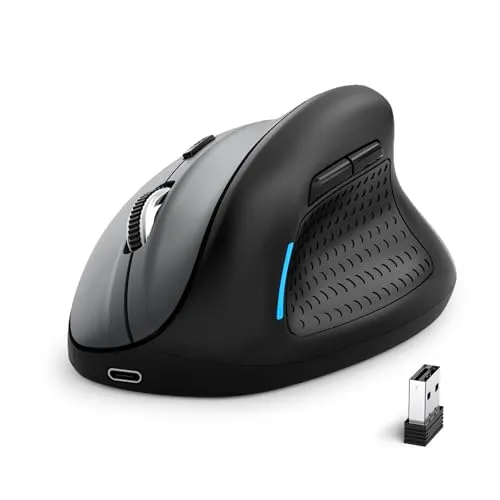
Currency: PKR
 We Deliver All Over Pakistan
We offer delivery services across Pakistan for your convenience. Here are the details of our shipping options:
 Leopards Courier
We also partner with Leopards Courier for deliveries throughout Pakistan. Here are the estimated delivery times for different scenarios:
Expedited delivery within 48 hours. Please note that the delivery times mentioned above are approximate and may vary depending on the location and other factors. We strive to ensure safe and secure shipping for all orders.
At WaddaGamer, we prioritize the safety and security of your packages to ensure a smooth delivery experience.
You can exchange any product purchased from WaddaGamer within 14 days of purchase under the following conditions:
To raise a dispute, please notify us within 3–4 days of delivery by contacting our support team via email at support@waddagamer.com or by calling 0300-0680143. Each dispute will be evaluated on a case-by-case basis, and we strive to find a fair resolution for both parties.
For damaged items, it is essential to provide an unboxing video as evidence. Please email the video to support@waddagamer.com within 14 days of purchase to initiate the replacement process.
Returns:
If a product received does not match the description on our website, you have 7 working days from the date of delivery to claim an exchange or cancel the order. To initiate a return, the product(s) must be undamaged, unopened, and returned with all packaging materials and documentation.
Refund Policy:
If an order is canceled for any reason, the refund will be processed within 3 to 4 days. In the event that you are not satisfied with your purchase or there are certain circumstances where a refund is applicable, WaddaGamer offers a refund policy. If the payment was made through a merchant, the refund will be processed through the same merchant channel.
Please note that if the payment was made via credit or debit card, any applicable refund may take 7 to 10 additional working days to reflect in your account, as per Pakistan's payment security standards.
To initiate a refund, please contact our support team at support@waddagamer.com or WhatsApp: 0300-0680143 within the specified time frame.
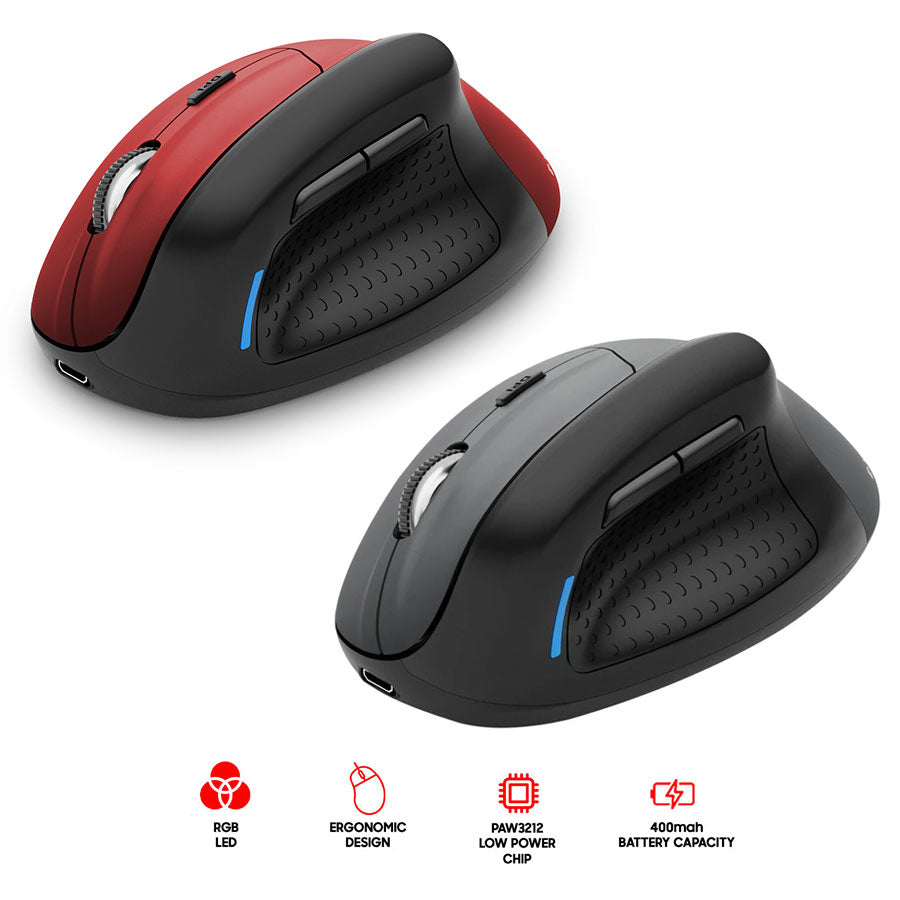
Introducing the E-Yooso X-45 Tri-Mode Mouse in black, which has tri-mode capabilities for extreme versatility. The device is adaptable and can function in any situation. The X-45's sleek design and precise performance make it more than just a mouse; it is a revolution in work, gaming, and everything in between. Take control of the workplace with a gadget built to handle your active and packed day.
Features:
Tri-Mode Connection
Low Power Chip
Ergonomic Design
Five DPI Free Switching
Standby and Sleep Function
Key Cable Separation, Type-C interface
Long-life key actuators
Non-slip roller
Thank you for choosing the E-YOOSO X-45 Ergonomic Vertical Mouse. This mouse is meticulously crafted with a unique vertical shape designed to minimize wrist strain and discomfort from prolonged usage, promoting a more natural hand posture. It offers versatile connectivity options, including 2.4G wireless, Bluetooth, and wired modes, making it suitable for various technological environments and devices.
Ergonomic Vertical Design: Reduces wrist strain and promotes a natural handshake posture.
Versatile Connectivity: Supports 2.4G wireless, Bluetooth, and wired USB-C connections.
Multi-Device Control: Seamlessly switch between two connected devices (e.g., Android, tablet, Mac).
Adjustable DPI: 5 adjustable DPI levels (800 / 1200 / 1600 / 2000 / 4800) for precise control.
6 Buttons: Includes standard left/right click, scroll wheel, DPI switch, and convenient 'Page Back' / 'Page Forward' buttons.
Rechargeable Battery: Built-in 400mAh battery provides extended usage on a single charge.
The E-YOOSO X-45 mouse features a built-in rechargeable battery. Before first use, or when the battery is low, connect the provided USB-C cable to the mouse's charging port and the other end to a USB power source (e.g., computer USB port, USB wall adapter).

A full charge typically takes 2-3 hours and can provide 2-3 months of usage depending on usage patterns.

The E-YOOSO X-45 offers three ways to connect to your device:
2.1. 2.4G Wireless Mode (via USB Receiver)
Locate the USB receiver stored in the compartment at the bottom of the mouse.

Remove the receiver and plug it into an available USB port on your computer.
Slide the power/mode switch on the bottom of the mouse to the '2.4G' position (usually the middle position).
The mouse should automatically connect to your computer.
2.2. Bluetooth Mode
Slide the power/mode switch on the bottom of the mouse to the 'BT' (Bluetooth) position (usually the far position).
Press and hold the pairing button (often a small button near the switch) for a few seconds until the indicator light on the mouse starts blinking, indicating it's in pairing mode.
On your computer or device, go to Bluetooth settings and search for new devices.
Select 'E-YOOSO X-45' (or similar name) from the list of available devices to pair.
Once paired, the indicator light on the mouse will stop blinking and remain solid.
2.3. Wired Mode
Connect the provided USB-C cable to the mouse's charging port.
Connect the other end of the USB-C cable to a USB port on your computer.
The mouse will function as a wired mouse and charge simultaneously.


Left Button: Standard click function.
Right Button: Standard right-click function.
Scroll Wheel: Scroll up/down pages. Can also be pressed for middle-click functionality.
DPI Switch Button: Adjusts cursor sensitivity (DPI).

Forward Button: Navigates forward in web browsers or file explorers.
Backward Button: Navigates backward in web browsers or file explorers.
The mouse offers 5 adjustable DPI levels to suit your preference and task requirements. Press the DPI switch button (located behind the scroll wheel) to cycle through the following settings:
800 DPI (Lowest sensitivity)
1200 DPI
1600 DPI (Default/Medium sensitivity)
2000 DPI
4800 DPI (Highest sensitivity)

When connected via Bluetooth to multiple devices, you can switch between them by pressing the dedicated switch button on the bottom of the mouse (if available, or by re-pairing if not a dedicated switch).
Charging: Recharge the mouse when the indicator light signals low battery or when performance degrades.
Cleaning: Use a soft, dry cloth to clean the mouse. Avoid harsh chemicals or abrasive materials.
Storage: Store the mouse in a cool, dry place away from direct sunlight and extreme temperatures. If not used for extended periods, ensure it is fully charged before storage.
Issue | Possible Cause | Solution |
|---|---|---|
Mouse not responding | Low battery, incorrect mode, receiver not plugged in (2.4G), not paired (Bluetooth). | Charge the mouse. Ensure the mode switch is in the correct position. Re-insert the USB receiver. Re-pair the Bluetooth connection. |
Cursor erratic or jumps | Dirty optical sensor, unstable surface, interference. | Clean the optical sensor with a soft cloth. Use on a clean, flat mouse pad. Move away from other wireless devices. |
Cannot connect via Bluetooth | Mouse not in pairing mode, device's Bluetooth off, out of range. | Ensure mouse is in Bluetooth pairing mode (blinking light). Turn on Bluetooth on your device. Move mouse closer to the device. |
Buttons not working | Software conflict, physical damage. | Restart your computer. Check for driver updates. If physically damaged, contact support. |
Feature | Detail |
|---|---|
Product Dimensions | 4.63 x 3.22 x 0.1 inches |
Item Weight | 6.4 ounces |
Item Model Number | X-45 |
Batteries | 1 P76 batteries required (rechargeable) |
Connectivity Technology | USB (Wired), 2.4G Wireless, Bluetooth |
Movement Detection Technology | Optical |
DPI Levels | 800 / 1200 / 1600 / 2000 / 4800 |
Color | Gray Black |

Use these internal links to continue exploring similar categories and curated store sections.
Explore similar pc gear and discover more options in the same category.
Browse categorySee highlighted products that we surface across the store for quicker discovery.
View featuredKeep exploring more products related to E-YOOSO and adjacent gaming categories.
Explore more